Giving coding agents local search over your screenshots and code
A coding agent can read every file in a repository, but it can't grep a picture.
If you ask for "the screenshot of the broken checkout from last week", it has file names, dates and whatever text someone saved next to the image. If that isn't enough, it has to open the images one at a time.
Bigshot has a local MCP server for this. Claude Code and Codex can search a Project's screenshots by what they show, find retakes of a screen, and find the code behind one. The search runs on your Mac with EmbeddingGemma 2. This post covers why an agent needs it, how it works, and where it falls short.
What agents can already do without it
Bigshot already saves screenshots in your repo with an index.json that lists each file, its time, tag, note and on-screen text. For "my last screenshot" or "the ones tagged checkout", that file is enough, and the server's instructions tell the agent so.
Search is for the other questions, where you remember what a screenshot looked like and nothing more.
Most of a screenshot isn't text
We measured this with 40 plain descriptions of 49 real captures, written the way you would remember a screenshot rather than quote it: "period tracker with moon phases", "Formula 1 race countdown on yellow".
| Right capture first | In the top 3 | |
|---|---|---|
| EmbeddingGemma 2, query against the image | 33 of 40 | 39 of 40 |
| EmbeddingGemma 2, query against the OCR text | 25 of 40 | 33 of 40 |
| Keywords over OCR text, tags and notes | 11 of 40 | 14 of 40 |
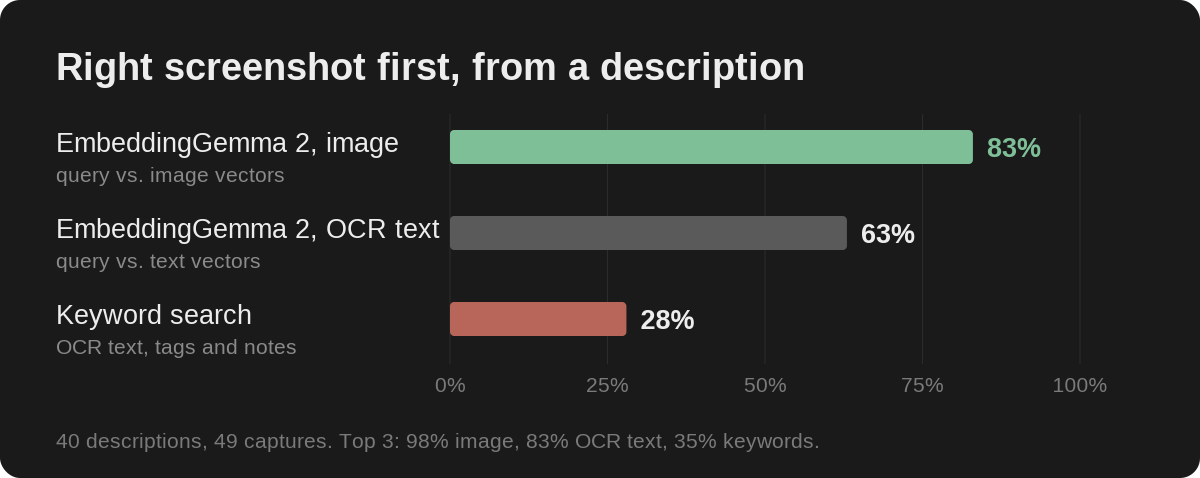
Keyword search is roughly what an agent gets from grepping an index. It found the right capture first 28% of the time. Image vectors did it 83% of the time, because a yellow race track or a moon-phase ring is never written on the screenshot. We wrote those descriptions ourselves after looking at the captures, so treat the numbers as a comparison between methods, not a forecast.
This fits the research on screenshots and agents: visual input helps most when the information is visual.
Opening every image is expensive
The fallback is to open images until the right one turns up. By the token rule for images, a full Retina screen costs about 4,760 tokens on Claude's high-resolution models.
| Tokens | |
|---|---|
| Opening 50 full-screen captures | about 238,000 |
| Searching, then opening the top 3 | about 14,000, plus the text of the results |
Search results are text. The server's instructions ask the agent to search first and open only the hits.
What the agent gets back
The agent chooses from six read-only tools: search_screenshots, similar_screenshots, screenshot_details, code_for_screenshot, search_code and list_tags.
Every result says why it was returned, so the agent can weigh it. This is a real result from our demo app, for the query "Beta badge":
{
  "file": "Screenshot 2026-11-09 at 12.21.49.png",
  "note": "Change the New badge to Beta.",
  "summary": "A list row for a Boards feature with a New badge, description, a count of 4 boards, and an Open button.",
  "tags": ["homepage"],
  "why": "contains “beta”, “badge” in its note, labels"
}
The agent then has the file name and your note, and can open that one image.
Screenshots and code connect through the Code map, the same index behind Code Lens. code_for_screenshot returns the components that render a capture, marked Confirmed when their exact text is on screen and Likely when they only look alike. search_code takes a description. "The table that lists customers" returned CustomersPage in src/app/customers/page.tsx first, lines 9 to 47, with the route /customers.
Screenshots also stay available between sessions. A capture pasted into a chat is gone when the chat ends. I compared those two ways of working in Codex Appshots vs. screenshots in your repo.
How the search works
Bigshot uses the 440M text and vision configuration of EmbeddingGemma 2 on the Mac's GPU, through Google's LiteRT-LM runtime. Text and images land in one 768-dimension space, so a description can be compared directly with a screenshot. The vectors are stored in SQLite on your Mac.
Search runs in two passes. Words in notes, tags, on-screen text and labels come first, because a literal match is strong evidence. Then come the captures that stand out by how they look.
"Stand out" needs a definition, because raw cosine scores are hard to use. On 58 captures, the mean for a query sat between 0.59 and 0.70 with a deviation of 0.02 to 0.04, and right answers scored 0.70 to 0.81. A fixed cut-off shows everything for one query and nothing for the next. So Bigshot scores each capture by how many standard deviations it sits above the rest of the index, and the bar is 1.5.
Measured on an M1 Pro:
| Model file | 388 MB, optional, downloaded once |
| Load | 3 to 7 s |
| Process memory | about 770 MB with the model loaded |
| Embed a query | 25 ms median |
| Embed a 2.3-megapixel screenshot | 247 ms median |
Why an MCP server and not a script
The vectors and the model already live in the app, because the Library's search uses them. The server is a small helper that forwards an agent's calls over a Unix socket to the running app. A one-shot command would have to load the model each time, at 3 to 7 seconds per call. Going through the app also means agents get the same index you do, and it stays current as you take screenshots.
The cost is that Bigshot has to be open. The server doesn't start it.
Why local
Screenshots hold things you wouldn't put in a repository: customer records, tokens in a terminal, messages from other apps. Searching them locally means embedding every image on your Mac and sending none of them to a search service. It also means no API key, no per-query cost, and search that works offline.
Local search doesn't make the whole flow private. Whatever the agent receives, it sends to its model provider, like any file it opens. Bigshot limits what that can be:
- Agents only see screenshots listed in the Project's
.screenshots/index.json. With Sharing off that is none, and in Review first it is the ones you approved. - A connection covers one Project. Asking for a file outside it is refused.
- Every tool only reads.
- Recent calls, on the Project's card, lists each call and what it asked for.
Auto tags, the source of the summary field above, are separate. They are switched on per Project and use the vision model of the connection you choose. Redact a screenshot if it holds something an agent shouldn't see.
Where it falls short
Embeddings can't say no. They always return a nearest neighbour. In the Code Lens benchmark, best matches on real screens scored 0.63 to 0.94 and on other apps' screens 0.54 to 0.77, with no threshold that separates them. Asked for "recipe for sourdough bread", in a Project with no recipes, the server returned its three nearest captures, each labeled "looks like it (0.57)". An agent has to read that score as weak, and open the image before it trusts the match.
Search by description makes mistakes. On Bigshot's own repository, I asked search_code for "the window where you put a screenshot on a gradient background and export it". It put the editor's export function first, and the Share window wasn't in the top five. Results from search_code are candidates for the agent to read.
Without the image model, search goes by words only. The results say so, so the agent knows what it searched.
We haven't measured the effect on agents. The numbers here score retrieval on a small set. We have no controlled test of whether agents finish more tasks with this search than without it. It is the same gap as the experiment at the end of the post on screenshots and LLMs.
Trying it
In Bigshot's menu bar, choose MCP Server Guide…. It installs the server on a Project and ticks off when your agent makes its first call. Then start a new session and name Bigshot in your question:
Use Bigshot to find my screenshot of the pricing page.Use Bigshot to find the code behind my last screenshot.It works on the Free plan for your one Project. The MCP server docs cover the setup and every error message.
More from the blog
Draw on your screen, and edit its text in the source
Bigshot 1.13 is out with two new features. The Pen draws on any app and saves your marks as a capture your agent can read. X-ray Edit lets you click text on screen and change it in the file it comes from.
Code Lens by example: four apps, one click to the line
Code Lens over a Python page, a zsh script, a Mac app and an iPhone app. What it labels, what repository search finds for the same text, and what the labels did and didn't change for Claude Code.
Do screenshots actually make LLMs better?
What the research says about giving AI agents screenshots. In WebVoyager, screenshots raised task success from 40% to 59%, with very large gains on visual sites and none on others. What that does and doesn't tell us about coding agents.