How accurate is Code Lens? Benchmarks on 20 stacks, and EmbeddingGemma 2 on a Mac
Code Lens labels what you select on screen with the component, file and line that renders it. You click a label and your editor opens there. For that to be useful it has to be right most of the time, and it has to say nothing when the screen isn't from your project.
This post is how we measure that, what the numbers are in Bigshot 1.5, and what the local embedding model, EmbeddingGemma 2, does and doesn't add. All runs are on a 2021 MacBook Pro with an M1 Pro, in a release build.
Results
| Opens the line that renders the text | 82% of 587 screen lines (7% in Bigshot 1.4) |
| Opens the right file | 93% |
Same task with grep, first match | 34% |
| Labels on another app's screen | 0 in 280 runs |
| Matching one screen on a 600-file repo | 220 ms median |
| Photo search, right capture first | 83% with EmbeddingGemma 2, 28% with keywords |
The test set
A screenshot only has text and pixels. To open the right place, Lens has to get from a line of text on screen to the line of code a developer would edit to change it. We call that line the render site:
- Literal text in a component or template: the line holding the text.
- Translated text: the line that uses the key, such as
t("hero.title"),stringResource(R.string.save)or{% trans %}. Not the locale file. - Text from a data array or JSON file: the line that renders it, such as the
.map(orForEach. Not the data line.
The corpus is 20 small apps, one per stack, each written the way that stack is usually written: React with react-i18next, Next.js with next-intl, Vue, Svelte, Angular, Astro, static HTML, Django, Rails, Laravel, Go templates, SwiftUI, a UIKit storyboard, Jetpack Compose, Flutter, React Native, WPF, a Rust terminal UI, copy kept in JSON and YAML files, and a Japanese and Chinese site. Each app has 3 to 6 screens written as the macOS text recognizer reads them, with the noise a real screen has: browser chrome, names, dates, prices, and paragraphs wrapped across lines.
That gives 97 screens and 587 lines with a known render site. A line counts as right when Lens opens it, or the line next to it.
To check that Lens stays quiet, we also run text from 14 other apps (Mail, Slack, Figma, Xcode, a Stripe checkout and others) against every fixture. Any label on those screens is a false positive.
Accuracy
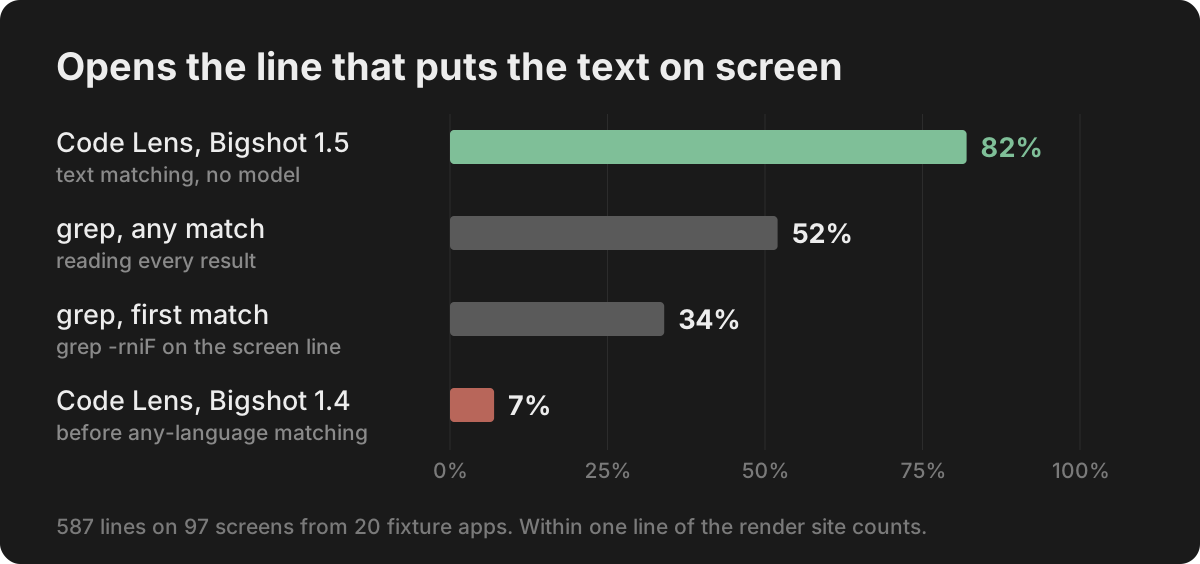
The baseline is what you would do by hand: search the project for the text you see, case-insensitive and literal, and open the first match. That gets 34% of lines. Reading every match and picking the right one gets 52%. Search goes wrong in predictable ways. For translated text the first match is the locale file, not the component. Data arrays point at the data, not where it is shown. Text that wraps on screen or is built from parts doesn't match at all: 16% of lines have no match anywhere in the project.
Lens handles those cases by linking keys to where they are used, data to the component that renders it, and wrapped lines back into one sentence. It opens the render site for 82% of lines, and the right file for 93%.
| Stack | Lens 1.5 | grep, first match | EmbeddingGemma 2, right file first |
|---|---|---|---|
| Flutter + ARB | 100% | 34% | 75% |
| React + react-i18next | 100% | 8% | 91% |
| Next.js, Japanese and Chinese | 94% | 15% | 84% |
| SwiftUI + String Catalog | 91% | 2% | 64% |
| Vue 3 + vue-i18n | 91% | 41% | 88% |
| WPF (.NET 8) | 90% | 51% | 43% |
| SvelteKit + svelte-i18n | 89% | 50% | 65% |
| Astro + content collections | 89% | 67% | 50% |
| Next.js + next-intl | 88% | 7% | 53% |
| React Native (Expo) | 86% | 40% | 77% |
| Static HTML | 85% | 59% | 71% |
| Angular + ngx-translate | 82% | 30% | 69% |
| Jetpack Compose | 80% | 28% | 80% |
| Go templates | 78% | 48% | 57% |
| Laravel Blade | 78% | 18% | 51% |
| Copy in JSON and YAML | 70% | 45% | 65% |
| UIKit storyboard | 66% | 33% | 59% |
| Django + gettext | 62% | 13% | 72% |
| Rails ERB + i18n | 58% | 27% | 83% |
| Rust, ratatui | 33% | 13% | 46% |
| All 587 lines | 82% | 34% | 67% |
The weakest stacks are the ones where screen text is assembled in code, not written in one piece: Rust format strings, Rails lazy lookups, Django blocks.
Why not embeddings alone
The last column above is a pure semantic search: embed the line you see with EmbeddingGemma 2, embed every component, and take the closest. It finds the right file first for 67% of lines and in the top three for 92%. Those numbers flatter it, since each fixture has only 3 to 10 files to choose from, and it returns a component, not a line.
The bigger problem is that it always returns something. On real screens the best match scores 0.63 to 0.94. On other apps' screens it scores 0.54 to 0.77. A cutoff above every other-app screen keeps only 49 of the 97 real ones. With no threshold that separates the two, embeddings can't say "this isn't your project".
So Lens works the other way round. Screen text has to be found in the project before anything is labelled. That is why it labelled nothing in 280 runs of other apps' text. The model ranks what text has already confirmed.
What EmbeddingGemma 2 does in Bigshot
EmbeddingGemma 2 is Google DeepMind's open multimodal embedding model, released on October 6, 2026 under Apache 2.0. Bigshot runs the 440M text and vision build through Google's LiteRT-LM runtime on the Mac's GPU. Text and images land in one 768-dimension space, so a description, a component and a screenshot can be compared directly. The model is optional: a 388 MB download in Settings, and Lens works on text alone without it.
It is used in three places:
- Lens tie-breaks. When a short crop's text is in several components, the screenshot picks the one it looks most like. It also proposes nearby components with no text of their own, such as an icon or a chart.
- Library photo search. You describe a screenshot and the Library finds it.
- Similar and duplicates. Image-to-image, using the same stored vectors.
In Lens: no change in accuracy on our real captures
We ran Lens on 38 real full-screen captures of Bigshot's own app and website, with and without the image. Ten have a known answer. Both ways it got 5 of the 10 right and labelled nothing on the 22 screens from other apps. The image changed which components were labelled on 7 of the 38 screens, without changing the score. Ten answerable screens is too few to show a small effect either way. On this set, text decides.
In the Library: photo search
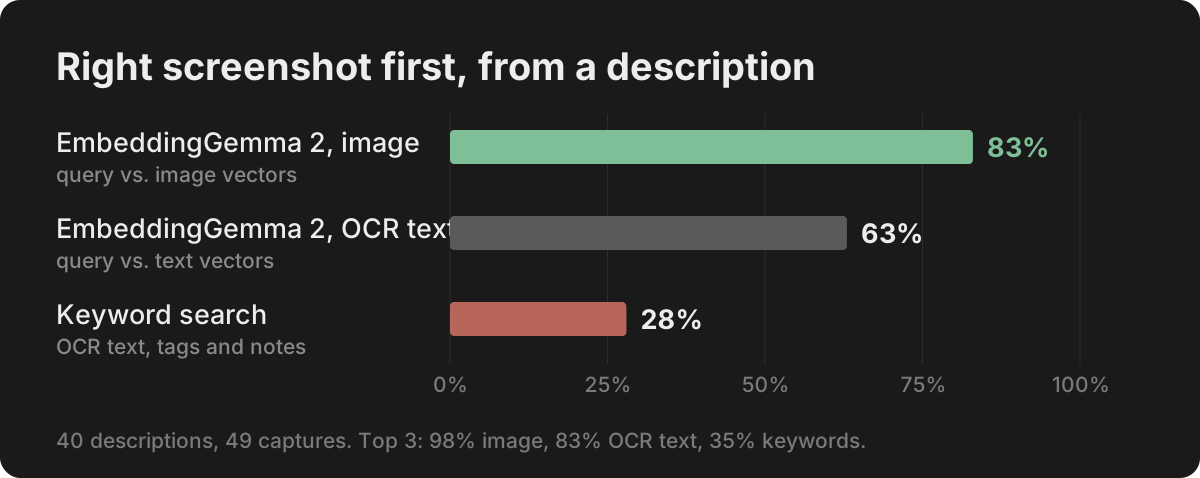
This is where the model earns its download. We wrote 40 plain descriptions of 49 real captures, the way you would remember a screenshot rather than quote it: "period tracker with moon phases", "Formula 1 race countdown on yellow", "tag picker dropdown under the notch".
| First | Top 3 | Mean reciprocal rank | |
|---|---|---|---|
| EmbeddingGemma 2, query vs. image | 33 of 40 | 39 of 40 | 0.90 |
| EmbeddingGemma 2, query vs. OCR text | 25 of 40 | 33 of 40 | 0.73 |
| Keyword search over OCR text, tags and notes | 11 of 40 | 14 of 40 | 0.34 |
Images beat the screenshot's own text by eight queries. A lot of what makes a screenshot memorable is never written on it: a waterfall photo, a yellow race track, a moon-phase ring.
Speed and memory
On the M1 Pro, Metal GPU, LiteRT-LM 0.18:
| Model file | 388 MB, downloaded once |
| Load | 3 to 7 s |
| Process memory | 20 MB before loading, about 770 MB after |
| Embed a query or a screen of text | 25 ms median |
| Embed a component card | 24 to 28 ms median |
| Embed a 2.3-megapixel screenshot | 247 ms median, 458 ms p90 |
| Code map of a 613-file Next.js app | 1.7 s on text, 10.7 s with the model (230 components) |
| Code map of Bigshot, 441 files | 2.9 s on text, 34.7 s with the model (962 components) |
| Lens matching per screen | 220 to 280 ms median, about 1.8 s for the slowest |
The model cost is paid when the map is built. After that only components whose text changed are embedded again. Matching a screen takes the same time with or without the model, because comparing one vector to a thousand stored ones is cheap.
Limits
- The fixtures are small apps written for the test, not production code. Each has 3 to 10 source files.
- The real-capture set is small, and the photo-search descriptions were written by us after looking at the captures.
- Lens also labels other components on screen, and those labels are less reliable than the line it opens. In the corpus, 160 of 204 labels were components that are on that screen.
- Rust terminal UIs (33%), Rails (58%) and Django (62%) are the weakest stacks.
- All timings are from one M1 Pro. Newer Macs will be faster; Google's model card lists 9.5 ms per text embedding on an M5.
The 20-app corpus and the test that scores it are part of Bigshot's test suite, so every change to matching is measured against the same 587 lines.
More from the blog
How to paste a screenshot into Claude Code on a Mac
Control-V, not Command-V. The four ways to get a screenshot into Claude Code on macOS, which one to use when, and how to make the image worth reading.
Save screenshots in your repo so Claude Code and Codex can find them
Instead of pasting screenshots into every conversation, keep them in the project with an index the agent reads. How it works, what the index holds, and how to keep it out of Git.
How to give Codex a screenshot: CLI, IDE extension and Mac app
Every way to attach a screenshot in OpenAI's Codex — the --image flag, pasting in the CLI, Shift-drag in the IDE extension and the app, Appshots — and how to let Codex find screenshots in your repo.