Codex Appshots vs. screenshots in your repo: which to use
There are two ways to show Codex what is on your screen without pasting anything. Appshots, built into the ChatGPT desktop app, send the window in front to a Codex thread when you press both Command keys. Screenshots in the repository are saved in the project with an index, and Codex reads them when you ask about them.
They answer different needs. An Appshot is the quickest way to hand over one whole window right now. Screenshots in the repo are for a part of the screen you have marked up, or for several captures that you and the agent come back to over a task.
What an Appshot sends
Codex has been part of the ChatGPT desktop app, on macOS and Windows, since July 2026. Appshots work there. According to OpenAI's Appshots documentation:
- What it captures. The frontmost window only: an image of what is visible, plus the window's text, including text scrolled out of view.
- How to take one. Bring the window forward and press both Command keys on a Mac, or both Alt keys on Windows. A custom hotkey can be set in the app's settings.
- Where it goes. By default it starts a new chat, unless you used a chat in the last 60 seconds, in which case it joins that one. Appshot destination in settings can fix it to the current or a new chat.
- Permissions. On a Mac it needs Screen & System Audio Recording for the image and Accessibility for the text.
- Where it is kept. In the session file, like an image you attach by hand.
The text is what makes it useful. A long log, a settings page or an article arrives as text Codex can quote and search, not only as pixels it has to read.
What Appshots don't do
- It takes the whole window. There is no area or panel capture, so a bug in one corner arrives with everything around it.
- No marks. You can't crop, draw an arrow, number steps or redact before it is sent. Whatever text is in the window, including text off screen, goes along with it.
- It stays in one conversation. The Appshot is part of that session. A new session, or another agent, starts without it.
- Only the desktop app takes them. The Codex CLI can show an Appshot from a resumed session but can't create one. Claude Code can't read them.
- Some apps give only the picture. For Google Docs, Gmail, Sheets and Slides, Codex may get the visible screenshot and not the full content.
What screenshots in the repo do
Bigshot saves each capture taken while a Project is active in .screenshots/ at the root of the repository, kept out of Git, and lists it in .screenshots/index.json:
{
  "file": "Screenshot 2026-10-27 at 10.12.40.png",
  "takenAt": "2026-10-27T10:12:40+01:00",
  "tags": ["checkout"],
  "app": "Safari",
  "note": "Total ignores the coupon",
  "text": "Subtotal $40.00 …"
}
A short block in AGENTS.md tells Codex where the index is, so you can ask in any session, in the desktop app or the CLI:
look at the screenshots tagged checkout and fix the total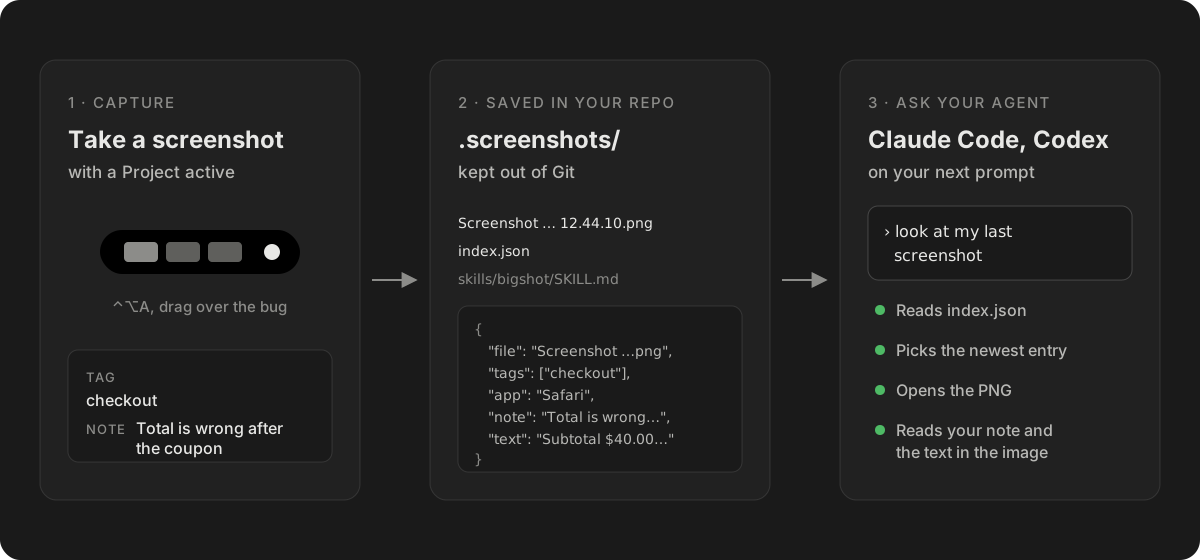
- Any part of the screen. An area, a window, or Smart capture, which snaps to the panel under the pointer.
- Marked before the agent sees it. Crop, arrows, numbered steps, measurements and redaction in the editor. See How to annotate a bug screenshot.
- There for the whole task. "The last one", "the ones tagged checkout" and "the one with the error" still find the right files next week, in a new session.
- The same files for every agent. Claude Code reads them through
CLAUDE.md, Codex throughAGENTS.md. - You choose what is shared. With Review first, a capture is listed for agents only after you approve it, so you can redact it first.
What screenshots in the repo don't do
- No text beyond the pixels. The
textfield is OCR of the image, read on your Mac. Anything scrolled out of view is not in it, so a long log needs several captures, or an Appshot. - It needs setup. One Project per repository, set up once in Bigshot's Settings › Projects. It is free for one Project.
- It is not a security boundary. Anything with access to the folder can read the screenshots.
Side by side
| Appshots | Screenshots in the repo | |
|---|---|---|
| What is captured | The frontmost window | An area, a panel or a window |
| Text | The window's text, including off screen | OCR of what is visible |
| Crop, mark, redact first | No | Yes |
| Lasts | One session | Until you delete it |
| Several captures for one task | One at a time, into a chat | Grouped by tag, with notes |
| Codex desktop app | Yes | Yes |
| Codex CLI | Shows them, can't create them | Yes |
| Claude Code | No | Yes |
| Setup | Two macOS permissions | A Project in Bigshot |
Which to use
| You want to | Use |
|---|---|
| Show Codex a whole document, log or settings page | An Appshot |
| Ask a quick question about the window in front | An Appshot |
| Point at one element, or a bug in one corner | A capture, marked in the editor |
| Hide a key, an email or customer data first | A capture, redacted, with Review first |
| Collect references over a day, then build from them | Captures under one tag; see the moodboard post |
| Work in the CLI, or in Claude Code as well | Screenshots in the repo |
The two work together. An Appshot can start a thread with the whole page's text, and marked captures in the repo can show the parts that are wrong.
Setting it up
- In Bigshot, open Settings › Projects › Add Project… and choose the repository.
- In the plan, keep Add Bigshot instructions to
AGENTS.mdand Share captures with agents automatically switched on. Sharing is off until you turn it on; choose Review first later if you want to approve each capture. - Click Create Project, take a screenshot, then ask Codex about it.
How the index works is in Save screenshots in your repo. Every other way to attach an image in Codex is in How to give Codex a screenshot.
More from the blog
Do screenshots actually make LLMs better?
What the research says about giving AI agents screenshots. In WebVoyager, screenshots raised task success from 40% to 59%, with very large gains on visual sites and none on others. What that does and doesn't tell us about coding agents.
Code Lens X-ray: see the line of code behind each line on screen
X-ray in Code Lens draws the source line behind each line of text on screen, and how the page's components, lists and translation files connect. How it works and what it gets wrong.
Code Lens on a 3,000-file repo: setup from 18 s to 5.9 s, matches under 0.8 s
On a large repository the first Code Lens in Bigshot froze the app for about 22 seconds. Why it happened, the four changes in 1.7.6 that fixed it, the numbers before and after, and what is still slow.