Save screenshots in your repo so Claude Code and Codex can find them
Most screenshots reach a coding agent by hand. You take one, paste or drag it into the conversation, and when the conversation ends it is gone. If you need it again, you find the file and do it again.
There is another way: put screenshots where the agent already looks.
The agent already reads your repo
Claude Code and Codex work inside a project folder. They read its files, and they read CLAUDE.md or AGENTS.md for instructions about the project. If screenshots are saved in the project, with a file that says what each one is, the agent can find them itself:
look at my last screenshot and fix the spacing I markedcompare the two screenshots tagged checkout and tell me what changed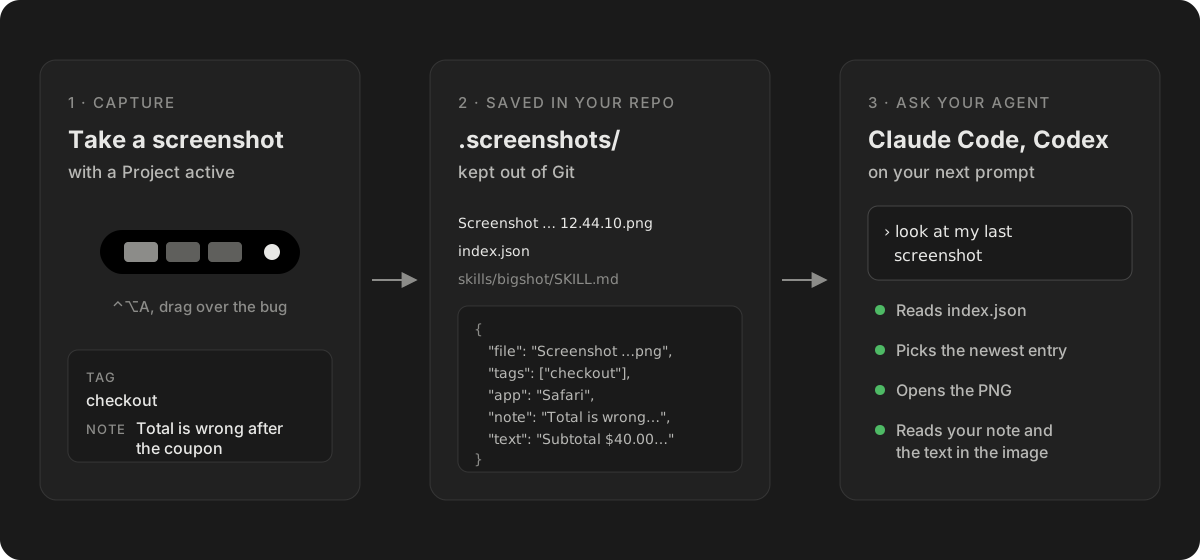
What Bigshot writes
While a Bigshot Project is active, captures are saved in .screenshots/ at the root of the repository:
.screenshots/
  .gitignore                              keeps the folder out of Git
  index.json                              what agents read
  Screenshot 2026-10-05 at 12.44.10.png
  skills/bigshot/SKILL.md                 how an agent should use the index
index.json lists screenshots newest first:
{
  "file": "Screenshot 2026-10-05 at 12.44.10.png",
  "takenAt": "2026-10-05T12:44:10+02:00",
  "width": 1626,
  "height": 460,
  "tags": ["checkout"],
  "app": "Safari",
  "note": "Total is wrong after the coupon",
  "text": "Subtotal $40.00 …"
}
The skill file tells the agent how to read it: "the last one" is the first entry, "the ones tagged checkout" are the entries with that tag, "the one with the error dialog" means searching notes and text, then checking the image. Five lines in CLAUDE.md or AGENTS.md point at the skill. The same skill is published at /.well-known/agent-skills/bigshot/SKILL.md.
Here is Claude Code doing it, from a real session:
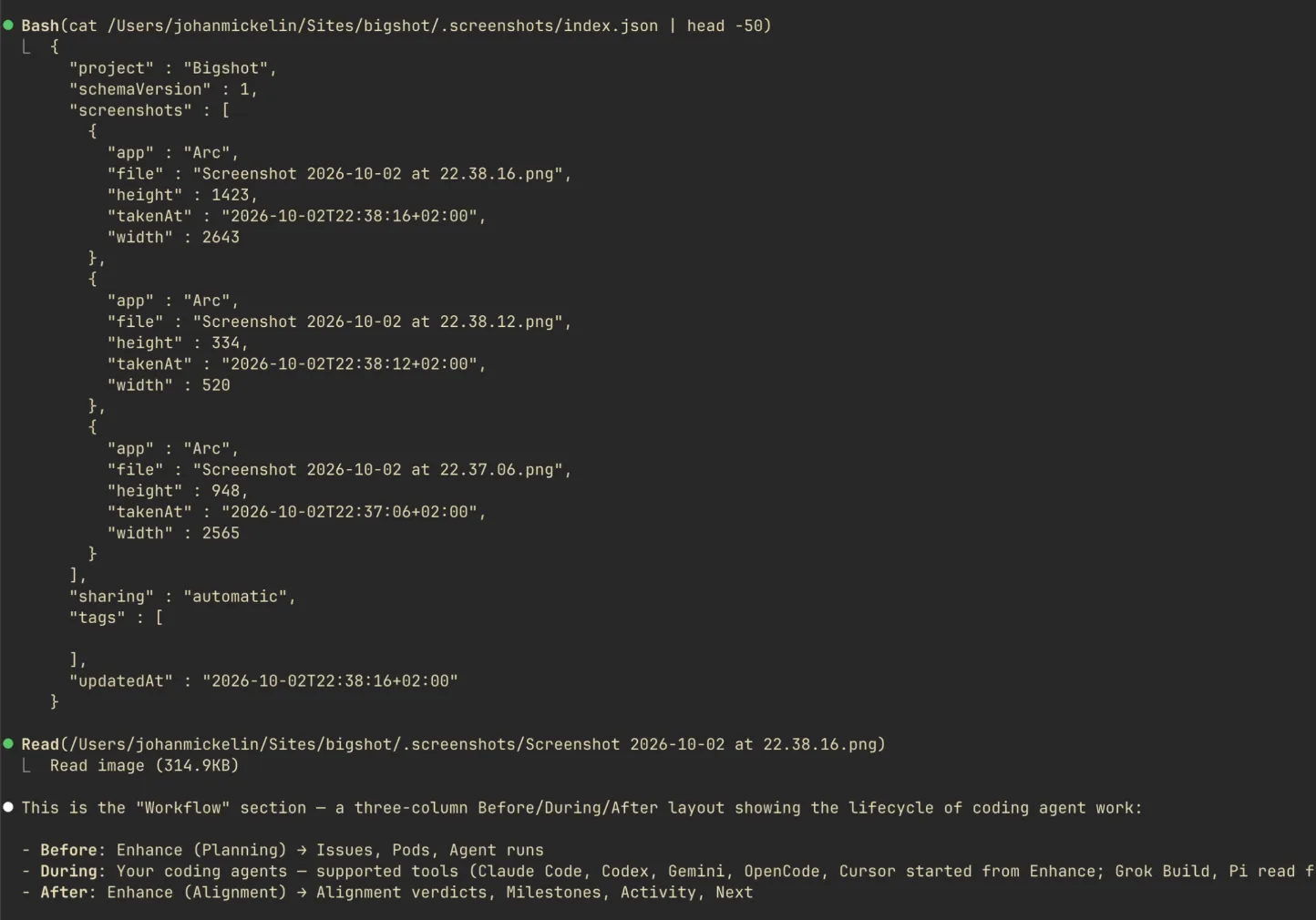
Nothing is pushed into a conversation. The agent reads files, the same way it reads your code, and a new capture is there on your next prompt.
Why an index beats file names
A screenshot's file name only says when it was taken. The index adds what you would search by:
- Tags. A task tag such as
checkoutgoes on every capture while it is active. On a feature branch, Bigshot offers one named after the branch. - Notes. What the agent should notice, for anything the image does not say: "only after applying a coupon".
- Text. With OCR on, the text in each image is read on your Mac and saved, so "the one with the error dialog" finds the capture that says Error, and the agent can search the code for the exact string.
- Source app. Which app was in front.
Keeping it out of Git
Screenshots are not source code. The folder carries its own .gitignore, and Bigshot offers to add /.screenshots/ to the repository's .gitignore as well. If screenshots were committed before, it shows you the git rm -r --cached .screenshots command to run yourself; it never changes what Git tracks on its own.
Choosing what the agent sees
| Sharing | What agents can read |
|---|---|
| Off | Nothing. The index is empty. |
| Automatic | Every capture you have not excluded, as soon as it is taken |
| Review first | Only captures you approve with Share now |
These are conventions for finding files, not a security boundary: anything with access to the folder can read it. For screenshots that may contain customer data or secrets, use Review first and redact before approving; see How to redact a screenshot.
Setting it up
- Open Bigshot's Settings › Projects › Add Project… and choose the repository.
- Bigshot checks the folder without changing it: whether it is a Git repository, whether
.screenshots/is ignored, whetherCLAUDE.mdandAGENTS.mdexist, and whether Claude Code or Codex is installed. - Review the plan (each step except creating the folder is a switch) and click Create Project.
- Take a screenshot, then ask your agent about it.
The full reference is in Projects and screenshot context. Projects need a licence; capture, the editor and dragging screenshots into your agent are free.
More from the blog
How accurate is Code Lens? Benchmarks on 20 stacks, and EmbeddingGemma 2 on a Mac
Code Lens opens the line that puts on-screen text there for 82% of lines across 20 app stacks, against 34% for grep. What EmbeddingGemma 2 adds, how fast it runs on an M1 Pro, and where it doesn't help.
How to paste a screenshot into Claude Code on a Mac
Control-V, not Command-V. The four ways to get a screenshot into Claude Code on macOS, which one to use when, and how to make the image worth reading.
How to give Codex a screenshot: CLI, IDE extension and Mac app
Every way to attach a screenshot in OpenAI's Codex — the --image flag, pasting in the CLI, Shift-drag in the IDE extension and the app, Appshots — and how to let Codex find screenshots in your repo.